QuoteCapture
Insurance quoting flow across Auto, Property, and Flood. Simplified forms, smarter validation, Quick Quote path lets agents capture data faster and cleaner.
Intro
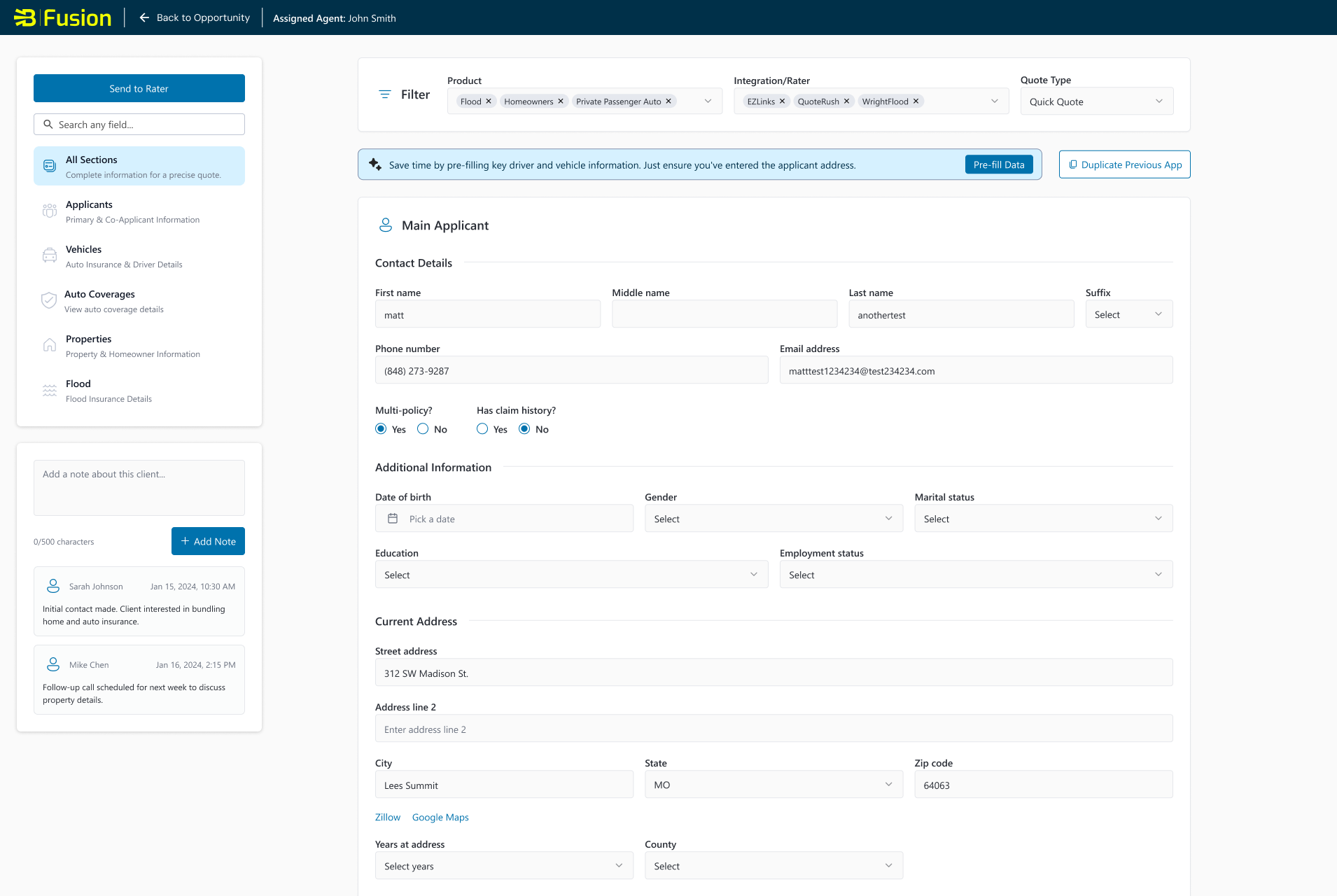
The Fusion for Agents QuoteCapture is a core part of the insurance quoting workflow, where agents enter customer, property, and vehicle information before generating quotes. As the platform grew, this experience became slow, overwhelming, and error-prone, impacting both efficiency and adoption. I led the end-to-end UX/UI redesign of the Data Tab to simplify data entry, improve validation, and introduce a faster Quick Quote workflow. The result is a cleaner, more intuitive experience that helps agents quote customers with greater speed and confidence.
Duration: 4 Months
Role: Lead UX/UI Designer
The Problem
Agents relied on the Fusion QuoteCapture to capture customer information before quoting, but the experience had become slow, overwhelming, and error-prone. Long forms, unclear required fields, inconsistent validation, and repeated data entry across product lines were causing frustration, delays, and drop-offs, ultimately reducing quoting efficiency and limiting adoption of the Fusion platform.
The Goal
Redesign the QuoteCapture to create a faster, clearer, and more intuitive data-entry experience. The goal was to simplify workflows, reduce errors, minimize unnecessary fields, support data reuse across products, and introduce a streamlined Quick Quote flow, ultimately enabling agents to generate accurate quotes more efficiently and confidently.
My Role
Led the end-to-end UX/UI design for the Fusion QuoteCapture, from discovery through final implementation.
Conducted user research, including interviews with insurance agents across multiple states to uncover pain points and workflow needs.
Mapped the existing quoting journey and identified opportunities to reduce friction and improve efficiency.
Created wireframes and high-fidelity UI designs that simplified data entry across Auto, Property, and Flood product lines.
Developed interactive prototypes to test Quick Quote flows, smart fields, error validation, and navigation patterns.
User Research
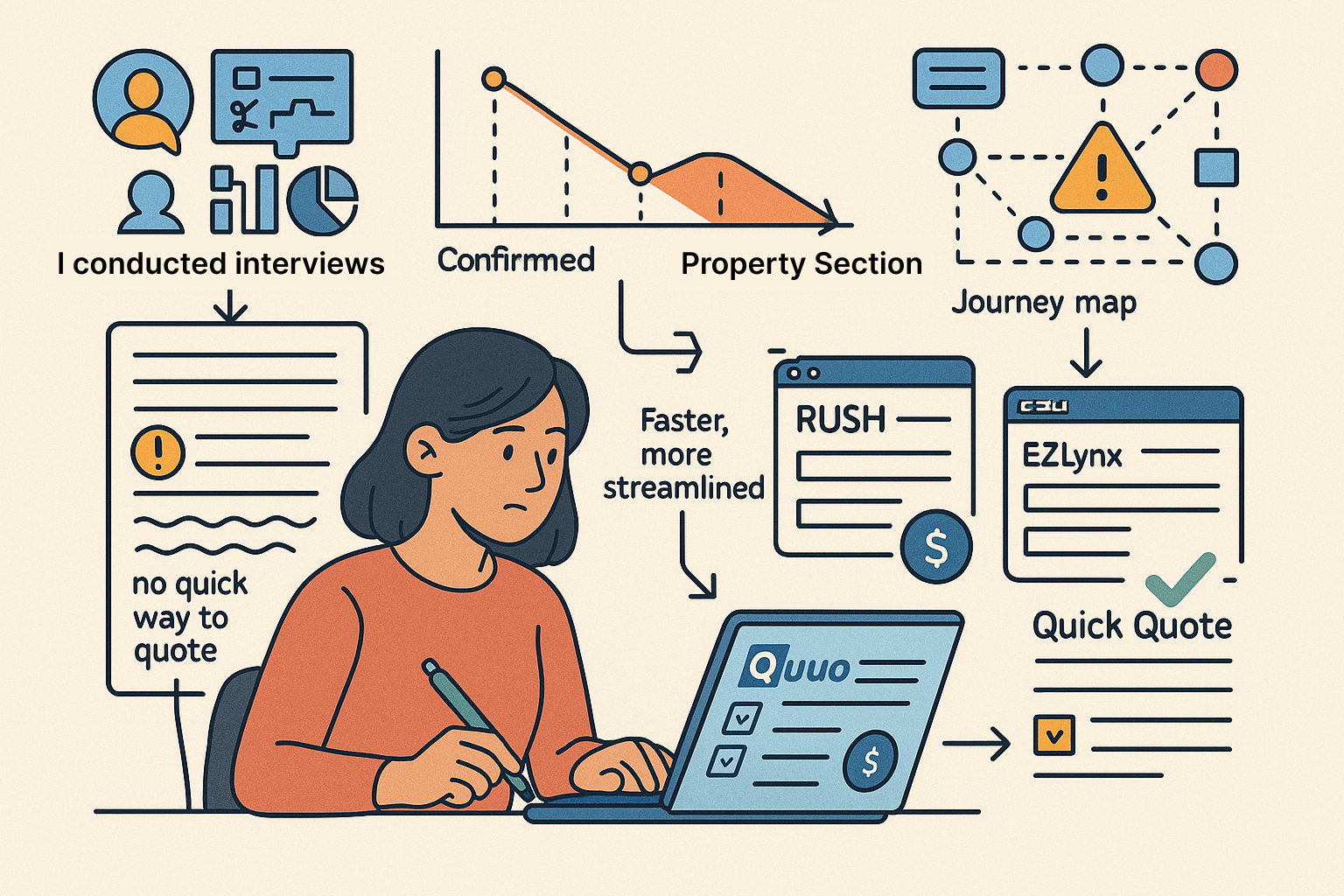
I conducted interviews, workflow observations, competitive analysis, and analytics review to understand friction in Fusion QuoteCapture. Agents consistently reported long, confusing forms, unclear fields, inconsistent terminology, repeated data entry, and no quick way to quote during calls. Analytics confirmed extended time-to-quote and high drop-off in the Property section. Comparisons with tools like RUSH and EZLynx highlighted faster, more streamlined industry standards. Mapping the quoting journey revealed gaps in clarity, validation, and efficiency. These insights guided the redesign, leading to Quick Quote, simplified forms, improved validation, and smarter automation and data reuse.
Key Pain Points & Solutions
Overwhelming forms
Agents faced long, cluttered sections, especially in Property, making it difficult to scan or complete data entry efficiently.
Unclear requirements
Required fields were not clearly distinguished from optional ones, leading to confusion and incomplete submissions.
Sequential error handling
The system displayed one error at a time, forcing agents into repetitive correction loops and slowing down workflows.
Inconsistent terminology
Field labels and error messages used different language, creating confusion about what information was needed.
Repeated data entry
Agents had to re-enter the same applicant and property information across Auto, Property, and Flood products.
Lack of a Quick Quote option
There was no lightweight workflow for agents needing to produce fast quotes during live customer calls.
User Personas

Priya Nair
Administrative Assistant
Priya is a 41-year-old Agency Operations Manager at a mid-sized independent insurance agency in the Kansas City metro, writing Auto, Property, Flood, and Umbrella lines across EZLynx, QuoteRush, and WrightFlood. She owns the entire Fusion onboarding workflow from configuring rater integrations to training new agents on QuoteCapture and is held accountable by the agency principal for quote accuracy and carrier submission quality. When a quote comes back rejected by EZLynx or returns with pricing errors, the fallout lands on her desk. She's technically capable, spends significant time in Fusion admin settings, and has strong opinions about what "a well-built quoting tool" should feel like from an ops perspective.

Marcus Thompson
Insurance Agent
Marcus is a busy insurance agent who handles multiple customer calls daily. He relies on fast, accurate quoting tools to provide customers with competitive options. Efficiency and clarity are essential for maintaining productivity and customer trust.
Information Architecture
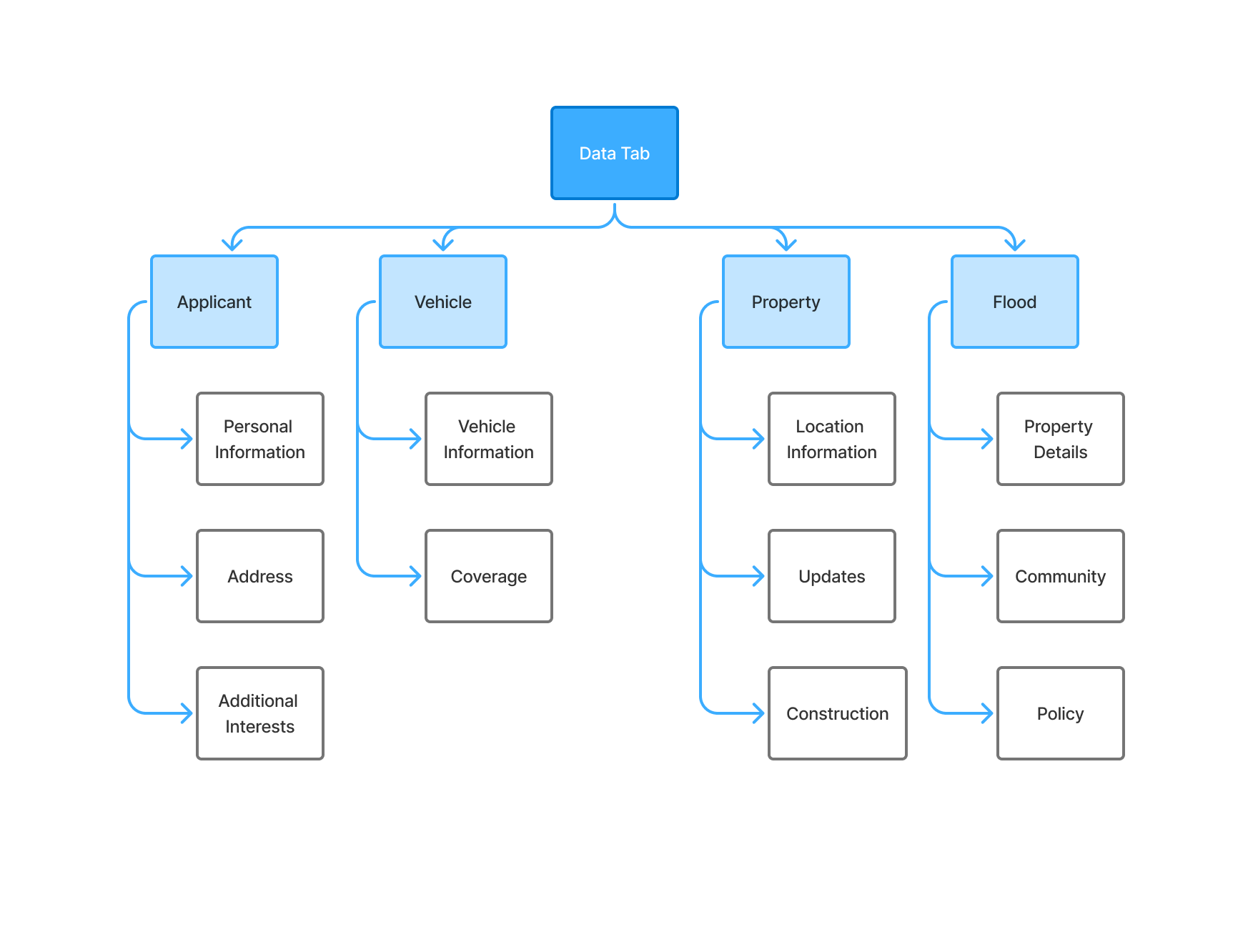
The Information Architecture for the redesigned QuoteCapture organizes complex insurance data into a clear, intuitive structure that aligns with how agents naturally work through a quote. The IA breaks the experience into four primary sections, Applicant, Vehicle, Property, and Flood, each containing logically grouped subcategories to minimize cognitive load and improve navigation. This structure ensures agents can quickly access the information they need, reduces redundant data entry, and supports both Quick Quote and Full Quote workflows. The streamlined hierarchy provides a foundation for scalability as new products and features are introduced.
Wireframes
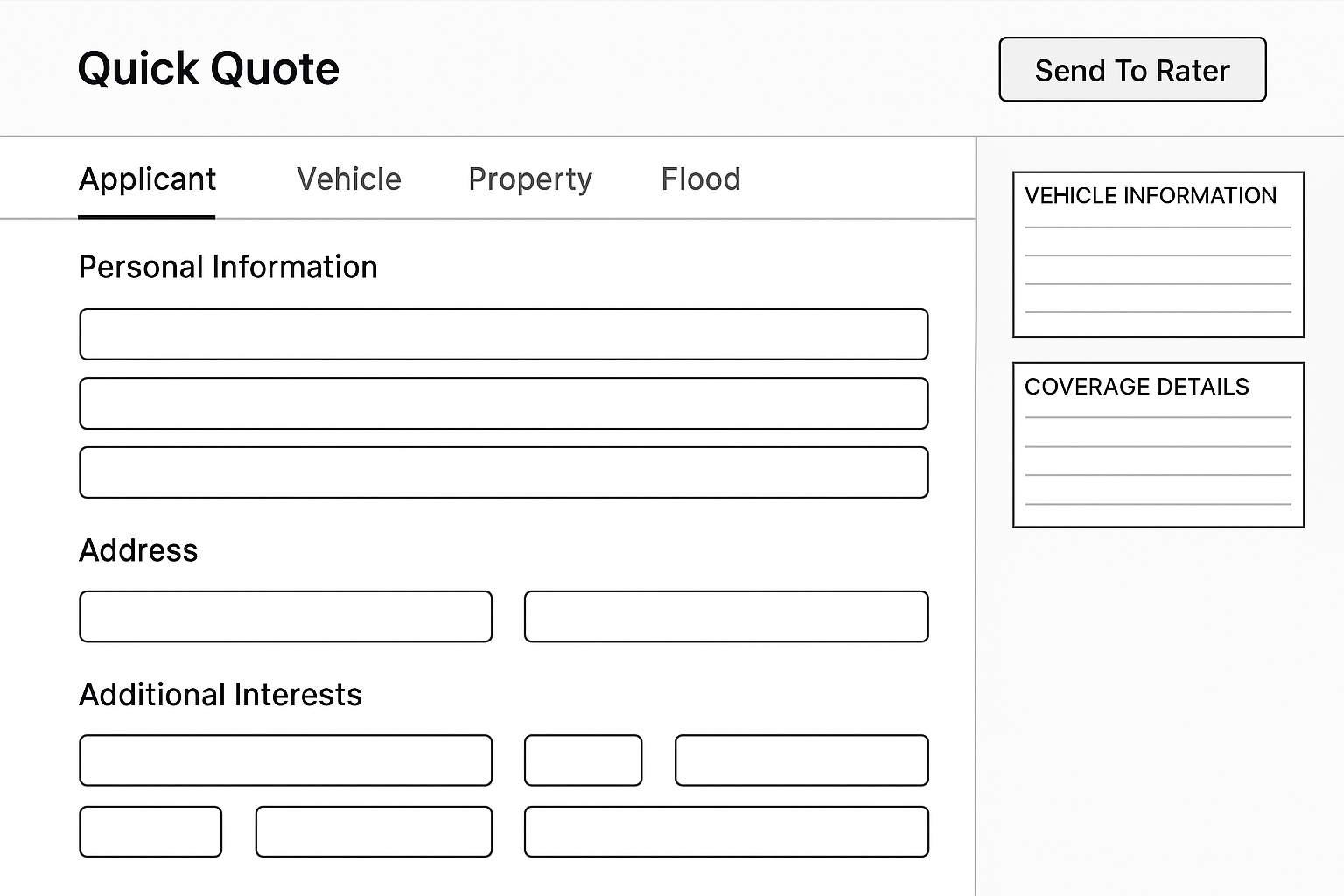
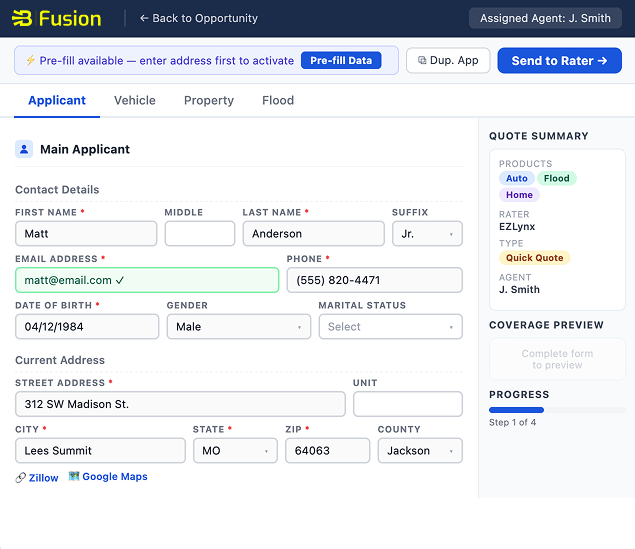
The wireframes illustrate the foundational structure of the redesigned QuoteCapture, focusing on layout, hierarchy, and key interaction patterns across the Applicant, Vehicle, Property, and Flood sections. They emphasize clarity and usability by presenting simplified groupings of form fields, streamlined navigation tabs, and a clear workflow leading to the “Send to Rater” action. The wireframes were intentionally created with minimal styling to prioritize function over aesthetics, allowing the team to validate information flow, field placement, and user workflows before moving into high-fidelity design. These early representations ensured alignment with stakeholder expectations and enabled efficient iteration based on testing feedback.
Low-Fidelity Wireframes
Mid-Fidelity System Views
Usability Study
We conducted a usability study to evaluate how efficiently agents could complete the redesigned QuoteCapture workflow, including Quick Quote, form navigation, property entry, and error validation. The goal was to identify usability gaps, understand real-time agent behavior, and validate whether the new design improved quoting speed, clarity, and overall satisfaction.
Study Type
Moderated Remote
Participants
7 Insurance Agents (Mix of new & experienced)
Session Length
30–40 minutes per session
Tools Used
Figma Prototype, Zoom, Observation Notes
Research Goals
Evaluate efficiency, identify pain points, validate Quick Quote flow, assess error handling clarity
Key Findings
- 1
Agents completed the Quick Quote flow noticeably faster and preferred the simplified, focused field set.
- 2
Inline validation and real-time error messages significantly reduced frustration and improved task completion accuracy.
- 3
The Property section remained the most challenging due to its size and number of required fields, indicating a need for further trimming or progressive disclosure.
- 4
Agents appreciated conditional “smart fields,” but needed clearer explanations for why certain fields appeared.
- 5
Navigation improvements like clearer grouping and collapsible sections, made the form feel more structured and easier to scan.
High-Fidelity Mockups
The high-fidelity mockups brought the redesigned QuoteCapture to life by visualizing the streamlined workflows, improved form hierarchy, and enhanced validation patterns. These designs incorporated the updated design system components, clearer labeling, and a more intuitive layout for Applicant, Vehicle, and Property information. The mockups reflected the final interaction patterns for Quick Quote, smart field behavior, error handling, and the improved “Send to Rater” flow. They served as the foundation for usability testing and engineering handoff, ensuring alignment across stakeholders.
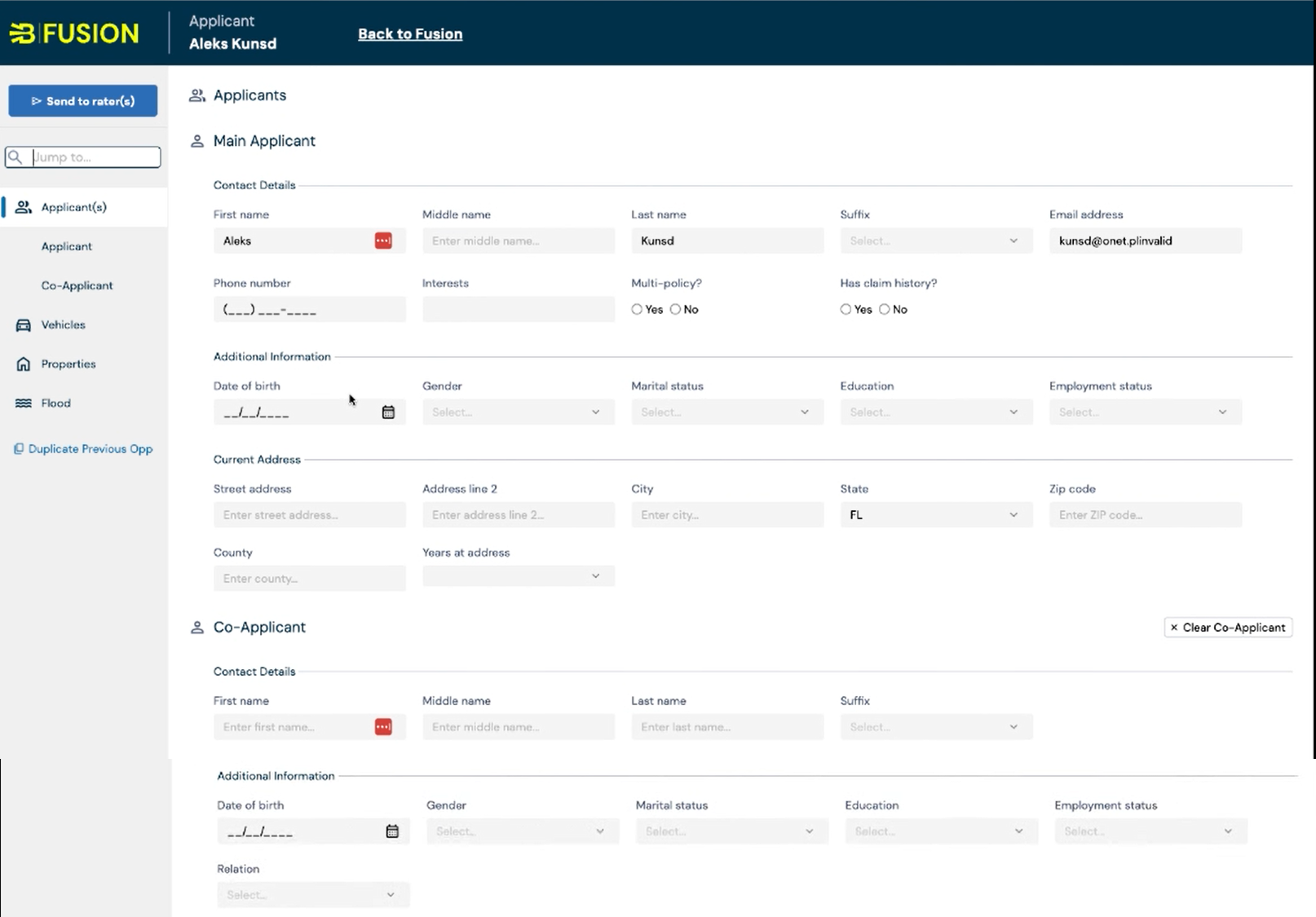
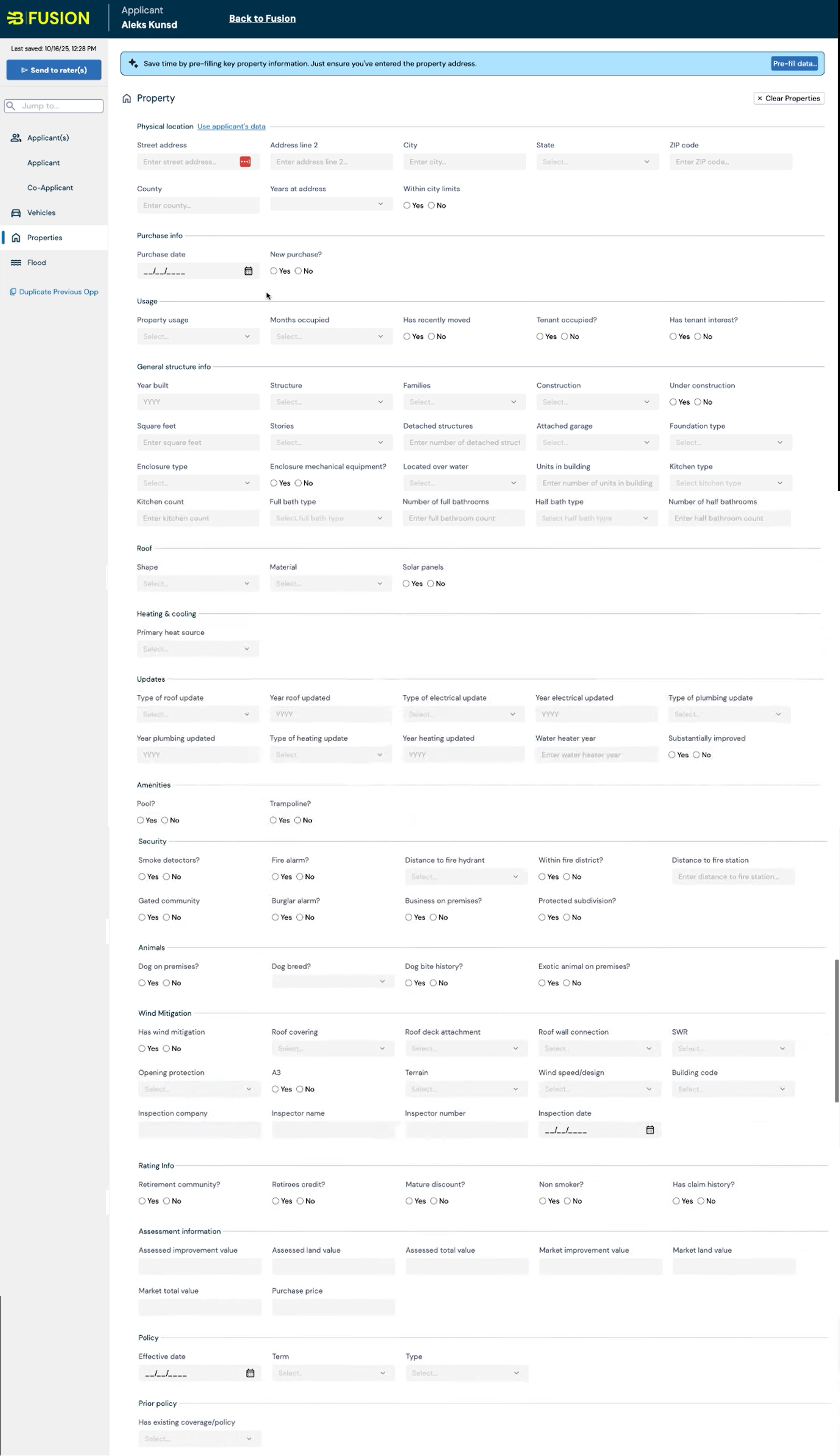
Before User Testing
Before usability testing, the redesigned QuoteCapture focused on reducing cognitive load by simplifying form sections and introducing Quick Quote as the default workflow. The experience emphasized clearer required fields, improved navigation, and smarter conditional fields. While the design addressed known pain points, assumptions remained about how quickly agents could move through the form, whether the Property section felt manageable, and how intuitive the dynamic fields and inline validation would be. Testing was essential to confirm these decisions and uncover any remaining friction.
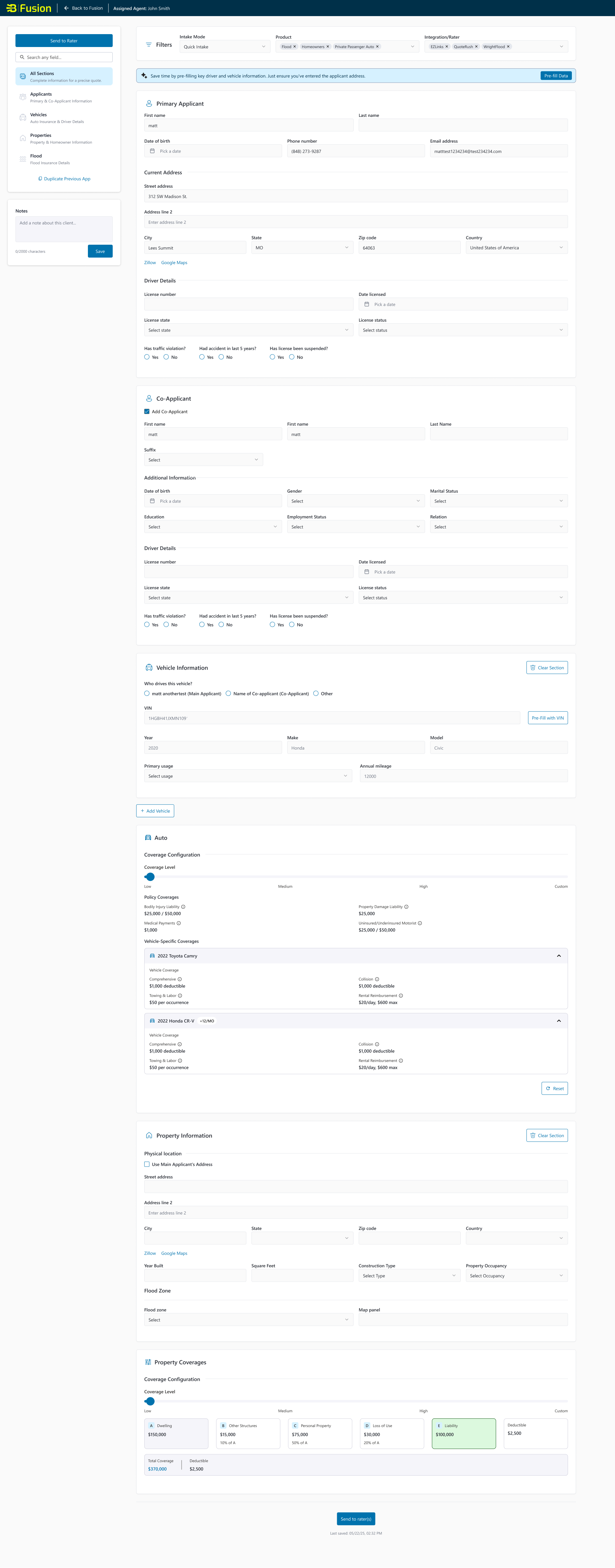
After User Testing
Following usability testing, several refinements were made based on agent feedback. Quick Quote proved effective but needed clearer guidance and a few further reductions in required fields. The Property section was streamlined to remove unnecessary fields and improve organization, addressing the most common user frustration. Conditional fields were updated with microcopy to explain when and why they appeared, and validation messaging was enhanced for clarity and consistency. These improvements created a smoother, faster, and more predictable workflow that aligned even more closely with real agent needs.
Accessibility Considerations
We ensured the redesigned QuoteCapture is usable for all agents by incorporating accessibility best practices throughout the design and development process. This included improving keyboard navigation, enhancing color contrast, refining error messaging for assistive technologies, and ensuring form components followed ADA and WCAG guidelines. Collaboration with QA and engineering helped validate accessibility behavior across screen readers, browsers, and interaction states.
Clear and consistent labeling across all form fields for screen-reader compatibility.
Improved color contrast for text, icons, and error states to meet WCAG AA standards.
Keyboard-accessible navigation throughout all form sections, buttons, and interactive elements.
ARIA-supported error messages that announce validation issues immediately to assistive technologies.
Impact
28%
Faster Quote Completion
5.4 min → <4 min
Reduced Intake Time
30%
Drop-Off Reduction in Property Section
$145K+
Premium Impact
Key Takeaways
Design simplicity and clarity directly influence agent efficiency and adoption, lean workflows outperform feature-heavy ones.
Real-time validation significantly reduces frustration and task repetition, improving both usability and data accuracy.
The Property section requires ongoing refinement due to its complexity; progressive disclosure and smarter defaults are essential for scalability.
Agent expectations are shaped by industry tools like RUSH and EZLynx, meeting or exceeding that standard is critical for Fusion to succeed.
Continuous testing with real agents provided invaluable insights and ensured the redesign aligned with real-world workflows.
Next Steps
Expand Quick Quote Capabilities
Enhance the Quick Quote workflow by refining minimum required fields and enabling additional product types. This will continue to reduce quoting time and better support agents during live calls.
Further Simplify the Property Section
Conduct deeper analysis of Property data requirements and explore opportunities for progressive disclosure, improved defaults, and smarter field logic to reduce cognitive load for agents.
Introduce Customizable Views
Allow agents and agencies to tailor form sections or field density based on their workflow preferences. Customization will improve efficiency, especially for high-volume agencies.
Integrate More Data Sources
Expand third-party data integrations (e.g., property metadata, risk indicators) to further minimize manual entry and improve accuracy across product lines.
Conduct Additional Usability Testing
Run follow-up usability tests with a broader group of agents to validate refinements made after the initial redesign and identify new opportunities for improvement.
Optimize for Accessibility
Continue enhancing keyboard navigation, screen-reader support, and color contrast to ensure the experience meets or exceeds ADA and WCAG guidelines across all product flows.
Monitor Performance & Adoption Metrics
Track usage trends, quote completion rates, error frequency, and agent satisfaction to measure the long-term success of the redesign and guide future enhancements.
Scale the Design for Future Products
Extend the updated layout, logic, and interactions to additional insurance products, ensuring consistency and scalability as Fusion expands.